Graduation inventory and checkout
in your pocket

Partiu Estoque & PDV manages products, stock in, stock out, and inventory counts, sells at the register and for tickets with a cart and QR codes, and also tracks equipment loaned out for events, all from your phone, with a barcode scanner and a link to each graduate.

Partiu Estoque product list with SKU, category, price, and stock level
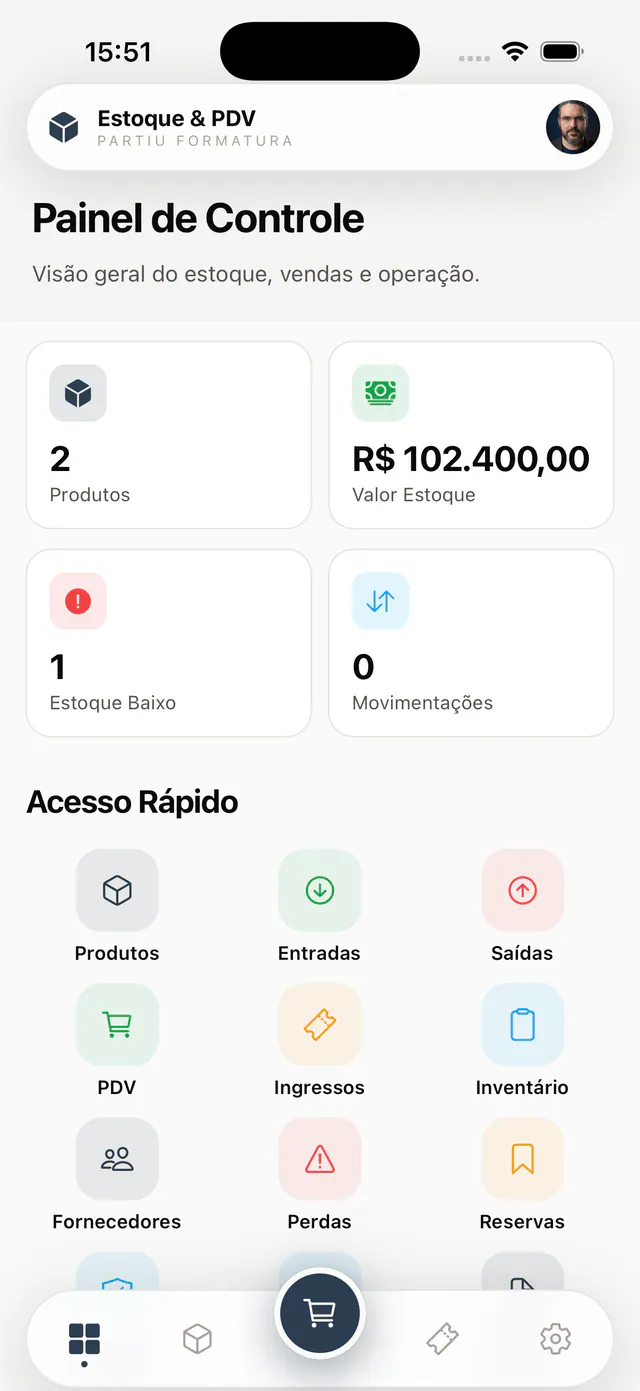
Partiu Estoque dashboard with products, inventory value, and quick access
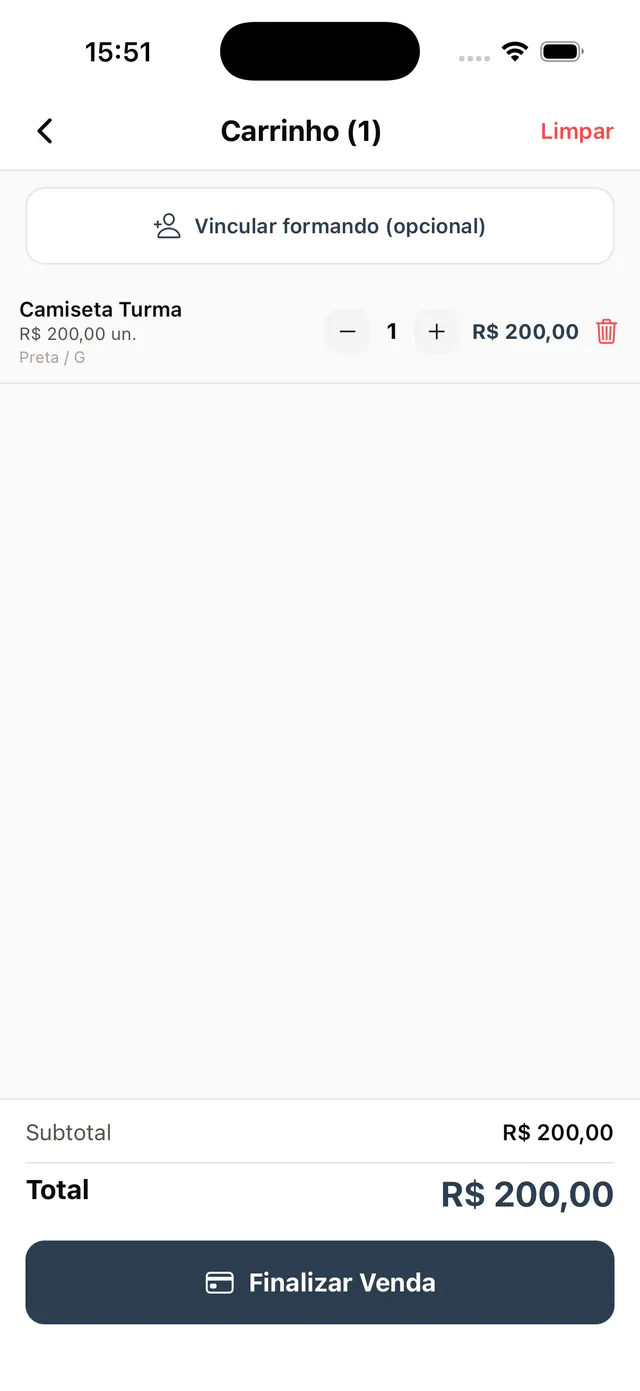
Partiu Estoque POS cart with product, quantity, and total to complete the sale
Inventory, checkout, and equipment

Your entire product operation in one app

From product setup to checkout sales, from purchasing to inventory counts and equipment loaned out for events: Partiu Estoque & PDV handles it all in just a few taps.

Product inventory

Product setup with SKU, category, price, photo, and variants, with balance and minimum level per item.

POS & checkout

Tap-to-add cart, quantities, variants, and an instant total to complete counter sales.

Stock in

Purchases and restocks with supplier, document, quantity, and value, confirmed in seconds.

Stock out

Manual stock deductions for use, giveaways, or transfers, with person responsible and reason.

Inventory counts

Item-by-item counts with percentage progress and open, completed, or canceled status.

Equipment

Track what goes out to each event: in use, overdue, partial, or returned.

Tickets

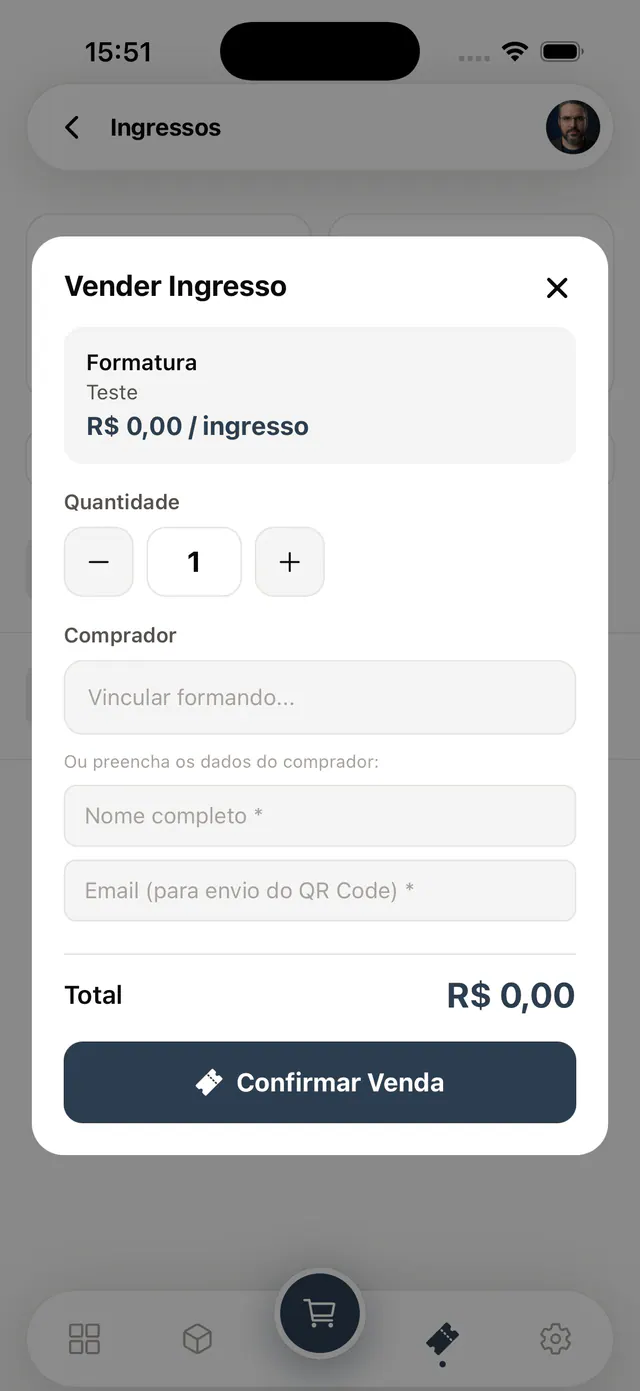
Ticket sales with quantity, graduate link, and QR codes sent by email.

Barcode scanner

Barcode scanner to find or receive a product without typing anything.

Dashboard

The whole operation at a glance

The home screen shows how many products you have, total inventory value, how many items are low in stock, and movements for the period. Right below, Quick Access leads to products, stock in, stock out, POS, tickets, inventory counts, suppliers, losses, and reservations, each area one tap away.

  • Total products and inventory value on one dashboard
  • Low stock alerts and movements for the period
  • Quick access to products, POS, tickets, and inventory counts
  • Suppliers, losses, and reservations one tap away
Dashboard with products, inventory value, low stock, and quick access
Products & inventory

Every product with SKU and balance

Register products with SKU, category, price, photo, variants (color and size), and minimum level. The list shows each item’s balance with green for OK and red for low stock, and the barcode scanner finds or receives a product instantly, without typing anything.

  • SKU, category, price, photo, and variants per product
  • Balance shown in green for OK and red for low
  • Configurable minimum level with restock alerts
  • Barcode scanner to search and receive stock
Product grid with SKU, category, price, and OK or low stock level
POS & checkout

Sell at the counter in seconds

Build the cart by tapping products, adjust quantities, apply variants like the class T-shirt, and complete the sale with the total calculated instantly. You can link the graduate to the purchase, automatically deduct stock, and record the stock out, all on a checkout screen designed for event day.

  • Cart built by tapping products
  • Variants like class T-shirt color and size
  • Graduate linked to the sale, with stock deduction
  • Total calculated instantly and sale completed in seconds
POS cart with class T-shirt, quantity, subtotal, and complete sale button
Inventory counts & equipment

Counts and loans under control

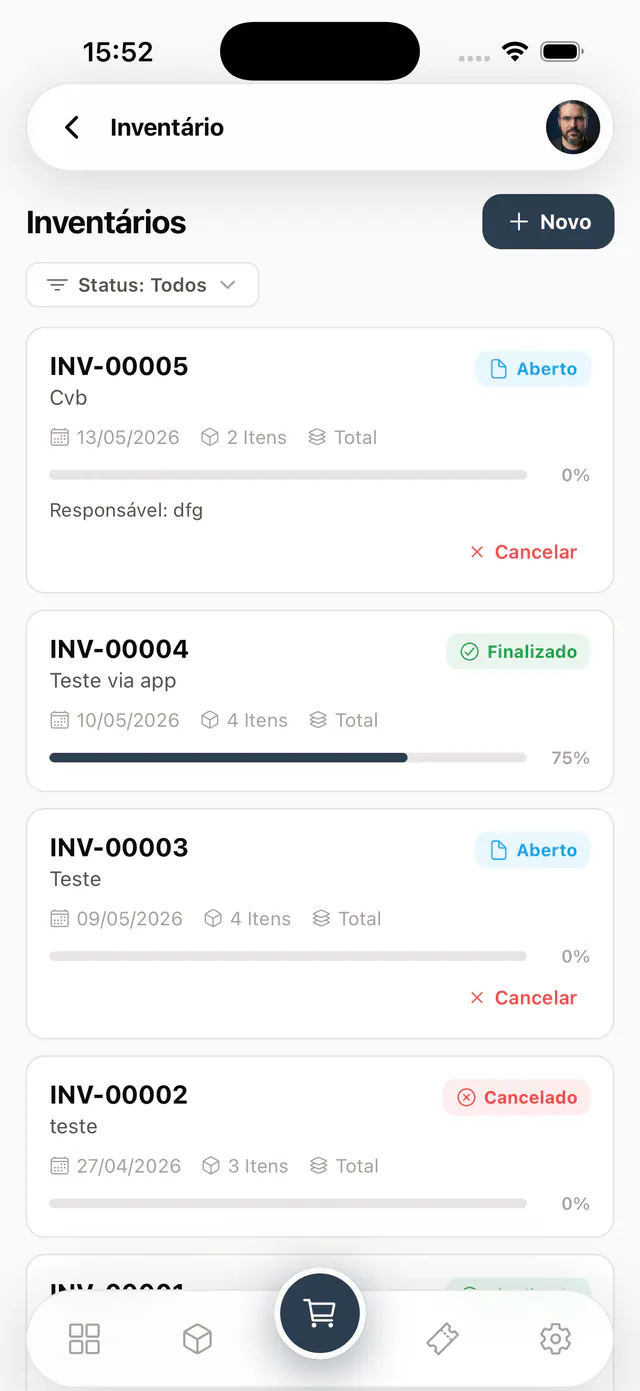
Run inventory counts item by item and track progress as a percentage, with open, completed, or canceled status. The equipment module tracks what goes out to each event: how many items are in use, overdue, partially returned, or already returned, with a one-tap record return button.

  • Item-by-item counts with percentage progress
  • Open, completed, or canceled status for each count
  • Equipment in use, overdue, partial, or returned
  • One-tap return logging for loaned items
Inventory count list with number, date, items, and count progress percentage
Custody, consignment, and traceability

Who owns it, who has it, and where it went

Physical balance does not erase ownership. The platform explicitly separates company stock held by third parties from third-party stock held by the company, with shipments, returns, and balances by custodian, freelancer, supplier, event, and class.

Company owned

Company stock held by third parties

Materials sent to freelancers, suppliers, event venues, or class representatives remain company property.

  • Shipment with third party, class, event, deadline, and document
  • Full or partial return, loss, damage, and consumption recorded
  • Balance per third party kept separate from internal available stock
Partner owned

Third-party stock held by the company

Products received on consignment keep the owner identified and do not inflate company assets or balances.

  • Consignment receipt with owning supplier or freelancer
  • Sales, consumption, returns, and settlement separated by owner
  • Accountability for movements and the balance still in custody
Graduation operations

Transfers to third parties and classes

Kits, T-shirts, giveaways, and materials can be sent to a class, event, or external operator without losing their origin.

  • Transfer linked to class, location, and custodian
  • Timeline with every movement and supporting document
  • Balance lookup by product, third party, class, and status
Custody traceabilityOrigin → shipment → custody → return → balance
1
Originowner and balance
2
Shipmentitems and document
3
Custodythird party or class
4
Movementuse, sale, or loss
5
Returnfull or partial
6
Reconciliationbalance per third party
Stock in, stock out, and more

Every inventory movement on record

Purchases, write-offs, losses, suppliers, and reservations keep balances accurate and each product’s history complete.

Suppliers

Supplier records linked to stock receipts and purchases for each product.

Losses & breakage

Record losses, damage, and adjustments with a reason, keeping balances accurate.

Reservations

Reserve products for events and customers before they leave inventory for good.

Movement history

Every stock in and stock out for each product, with date, quantity, and person responsible.

Categories

Products organized by category for faster search and reports.

Smart search

Search by name, SKU, asset tag, supplier, or document in seconds.

Inventory value

Automatic total inventory value based on balance and price.

Light & dark theme

An interface that adapts to your device, comfortable in the stockroom or at checkout.

Purchasing & Procurement

From quote to payment, with control before spending

Requisition, bidding, approval limits, budget, receiving, and finance follow the same trail. Every decision keeps the person responsible, date, chosen terms, and justification.

Quotes from multiple suppliers

Item-by-item comparison, without hiding the total cost

Each proposal is compared by item and by purchase total. The comparison considers price, shipping, lead time, payment terms, and taxes, lets you split items across suppliers, and records the winner and the reason for the choice.

Priceunit and total
Shippingcost and method
Lead timepromised delivery
Paymentterms and installments
Taxesimpact on cost
Winnerjustified choice
Three-way match

Purchase Order × Receipt × Tax Invoice

The system releases the payment flow only when quantity, price, and document meet company rules.

01
Purchase OrderApproved quantity, price, terms, supplier, class, cost center, budget, and approval limit.
02
ReceiptPhysical check of what arrived, including partial delivery, shortage, overage, damage, and shipping.
03
Tax InvoiceElectronic invoice or equivalent document linked by its access key, with amounts, taxes, and ancillary expenses.
Configurable tolerances

Quantity and price limits absorb allowed rounding without hiding relevant differences.

Item discrepancies

Shortages, overages, damage, price, tax, shipping, or mismatched documents are highlighted with evidence.

Hold and release

Discrepancies outside tolerance hold final stock and accounts payable until an authorized decision.

Approval with justification

Accepting, returning, correcting, or releasing requires permission, justification, and a record of who decided and when.

Access & security

Every movement with a name and a record

Company login

Access with your organization username and password, with password recovery.

Accountability trail

Every stock in, stock out, and sale records name, date, and quantity.

Reliable counts

Item-by-item inventory checks keep balances true to physical stock.

Protected equipment

Items loaned to events with checkout, deadline, and return tracking.

Company-level isolation

Each organization sees only its own products, sales, and movements.

Stock alerts

Low-level alerts prevent important products from running out at the event.

Download Partiu Estoque & PDV

Free for iPhone and Android. Sign in with your company login and start managing inventory, selling at checkout, and tracking equipment from anywhere.

Partiu Estoque & PDV is part of the Partiu Formatura platform.

For graduation and event companies

The app is for inventory.
The platform is complete.

Partiu Estoque & PDV is the products and sales module of a complete graduation management system. Subscribe to Partiu Formatura and get it all in one place: inventory and checkout, finance and billing, studio tools and galleries with facial recognition, tickets, contracts, fleet, and your company’s own app in the stores.

  • Inventory, POS, and equipment on your phone, with a barcode scanner
  • Product and ticket sales linked to the graduate
  • Stock in, stock out, losses, and inventory always up to date
  • Part of the complete platform for your graduation company

configurable modules · your app with your brand*.

* Apple requires the app to be published through an Apple account in your company's name. We handle the publishing for you.