01
Streams
Choose which live stream goes to the desk, with a channel overview and history of past streams.
- How many are live, scheduled, and archived
- Search by title or class
- Streams converted to video open in read-only mode
Partiu Producer is the app the production team uses during the ceremony. It puts the stream on air, shows how many people are watching right now, moderates the chat, opens polls for the audience, and keeps a record of the whole night. On the phone in the pocket of whoever is running around, or on the iPad resting on the sound desk.
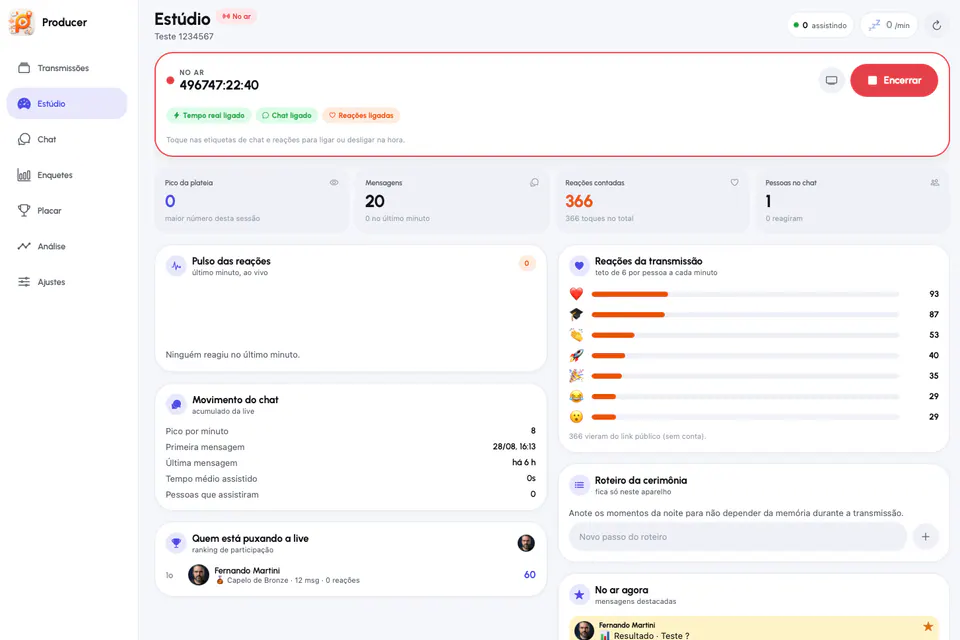
The on-air timer, who is watching, and how many messages and reactions have arrived. It all lives at the top of the screen and updates on its own while the ceremony goes on.
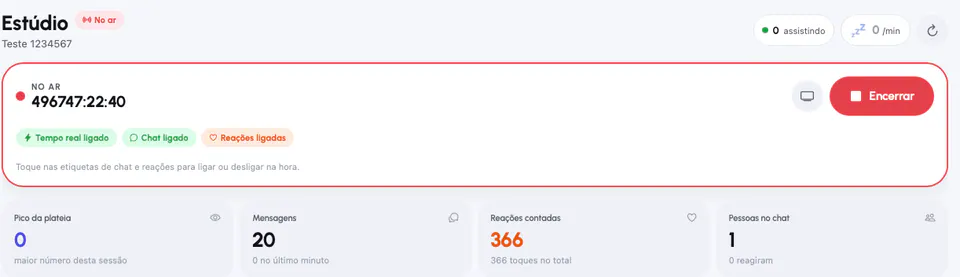
The live count comes from the real-time feed, with the trend for the last few minutes next to it. Current presence is not stored anywhere: it is the number of the moment.
The timer counts from the moment the stream went live, and it is the same clock shown in large type in Stage Mode.
Peak per minute, first and last message, average watch time, and how many people joined the stream.
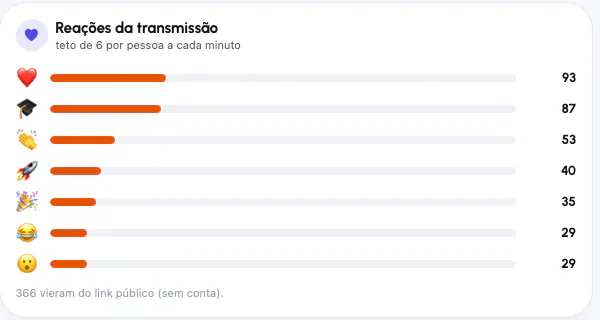
The total for the night and the pulse of the last minute, broken down by emoji, showing who came through the public link.
People producing a graduation do not have a spare hand to look for information across three systems. Producer brings control, moderation, and audience insights together in one place.
Go live, end, and go back on air. The encoder controls the signal, and the app waits for real confirmation instead of changing the label on faith.
The whole conversation reaches the device as it happens, with search, filters for highlights or public link guests, and history on demand.
Highlight, reply as production, delete, and mute. The muted list stays at hand and restores anyone’s voice with one tap.
The selected message goes up on the stream and stays pinned at the top of viewers’ chat. In Stage Mode, it rotates automatically.
One question live at a time, with automatic closing by timer, visible or hidden partial results, and a list of who voted for what.
Reactions float up the screen as they arrive and add up by emoji, with a per-person limit every minute so the number keeps meaning something.
Who is driving the live stream, with graduation cap levels, for this stream or across the whole channel.
Messages and reactions on the same axis, with conversation and reaction peaks marked. It shows what worked.
The entire stream conversation, including what moderators deleted, with search, copy, and sharing for anyone who needs it later.
The moments of the night noted right on the device, so the order does not depend on the memory of whoever is in control.
Create, view, and revoke the link that opens the stream without an account. People who join through it appear with the contact details they left.
Turn chat and reactions on or off by tapping the label, without leaving the screen or opening the admin dashboard.
The whole class conversation arrives in real time. From there, the production team highlights a message so it appears on the stream, replies with the production label, deletes what should not stay, and mutes anyone causing trouble. Older history loads on demand as you scroll up, and saved replies mean nobody types the same thing ten times in one night.
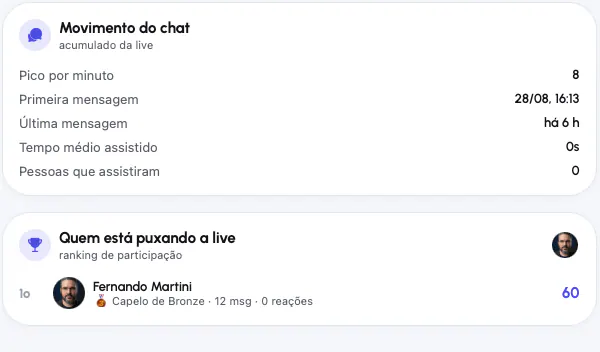
Every tap from the class becomes a number instantly. The reaction pulse shows the last minute live, the summary breaks it down by emoji, and the leaderboard tracks who participates most during the night, with graduation cap levels. There is a per-person limit every minute, so enthusiasm does not turn into inflated numbers.
Questions are written ahead of time, calmly, and go live when the ceremony calls for it. The results move on viewers’ screens and on the control desk.
Questions wait ready on the desk for the right moment. Nobody drafts anything while the stage is moving.
Opening the next one closes the previous one. The audience is never split between two questions.
Set a time limit, and the question closes without depending on someone remembering.
Results can be visible to everyone or only on the desk, so partial results do not sway people who have not voted yet.
Graduates always can. Public link guests can only if production allows it.
The list of voters for each option is available on the desk for review and the record.
The result becomes a chat message with editable text and can be pinned for everyone to see.
The live question appears large enough to read from a distance on the tablet resting on the desk.
Choose which live stream goes to the desk, with a channel overview and history of past streams.
The screen where production stays. Timer, audience, reaction pulse, chat activity, and highlights.
Live conversation moderation, with everything you need to do with a message.
The questions of the night: written ahead, opened on cue, and closed with the result frozen.
Reactions by emoji with time filters and a leaderboard of the most active participants.
Insights about the night after it happens, plus a record of what was said.
A graduation happens only once. The app was built with the gym with bad Wi-Fi, the phone that freezes, and the screen that stays on for four hours in mind.
The app joins the live room flagged as a monitor. The server removes production from the viewer count and does not record presence for it. Otherwise, the audience would look inflated and the people in control would appear on their own stream leaderboard.
The real-time feed shows what changes every second. Every fifteen seconds, a database summary arrives with totals, peak, and average time. One is not redundant with the other: when the connection drops, the summary keeps the screen going.
Production routes require committee permission, and the app checks it at the door. Operators never land on a desk where every button would return a permission error.
No screen takes a stream down on its own. Stage Mode has no on-air controls, and nothing in the app automatically ends what is happening on stage.
The layout adapts to the window width, not the device type. The same app works on the phone in your pocket and the tablet resting on the sound desk.
Timeline, peaks, leaderboard, and chat transcript remain available afterward. The recording becomes an archived video on Formatura TV with everything the class wrote.
Producer is the control desk for a complete video service. The same stream it puts on air is recorded, becomes on-demand video on Formatura TV, appears in the class app, and keeps that night’s chat, reactions, and leaderboard. It is part of Partiu Formatura and comes with your company subscription.
Works with Partiu Live in OBS and with Formatura TV after the night is over.