The graduation studio
from upload to delivery
Partiu Uploader is the desktop app for studios: upload photos in bulk, sort them by graduate with facial recognition, edit in the built-in professional editor, run production through the pipeline, and deliver everything in high resolution, all in one program.
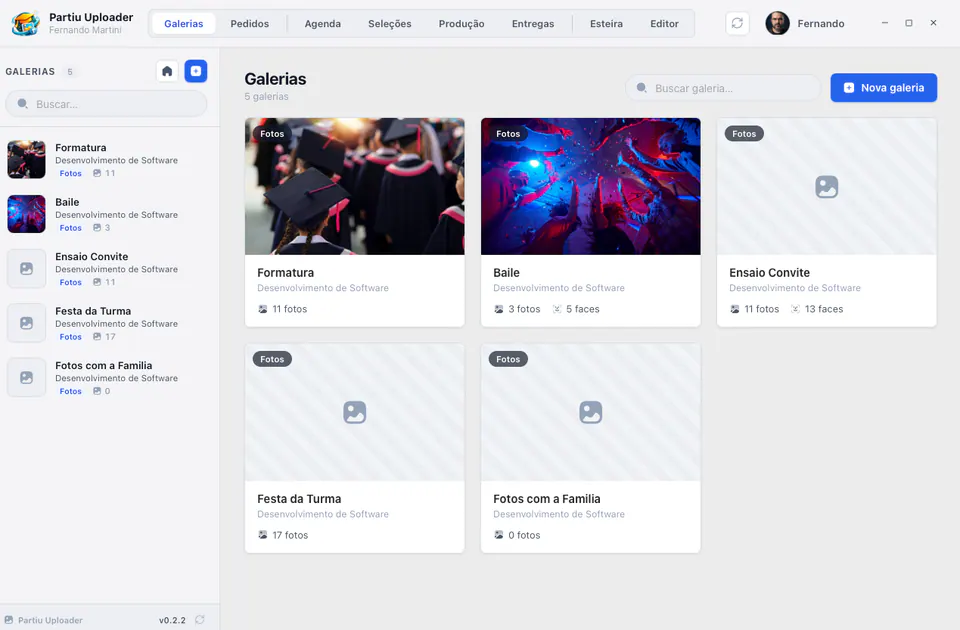
The complete workflow for graduation studios
From bulk upload to high-resolution delivery, including editing, selection, production, and scheduling: Partiu Uploader brings every step of photography work together in one place.
Galleries and bulk upload
Drag hundreds of photos at once. The app uploads in parallel batches, shows progress for each file, and retries only the ones that failed. Create photo and video galleries, set the cover, and manage everything with infinite scrolling.
Built-in professional editor
A Lightroom/Capture One-style editor inside the app: exposure, contrast, shadows, highlights, temperature, curves, sharpness, and vibrance. Import your Lightroom .xmp and .lrtemplate presets, organize photos into collections, and export everything in bulk at high resolution.
Guided editing pipeline
A wizard that guides each job step by step: Selection → Originals → Editing → Review → Delivery. Progress is saved per company, so you can close the app and resume where you left off without losing anything.
Graduate selections
Track the photos each graduate chose, review the selection, link images, and retouch the gown photo. One click sends the finished selection straight to the production pipeline.
Automatic face sorting
Organize photos by graduate with facial recognition. The app automatically links each image to the right person and shows matching stats, speeding up delivery of individual selections.
Session calendar
View and manage studio bookings right in the app: times, stations, and photographers, with every session detail at hand.
Orders and production board
Manage selection orders and track the flow on a kanban-style production board: see what is in each stage and move jobs through to completion.
High-resolution deliveries
Build high-resolution photo deliveries, link images to each graduate, and track metrics for what has been sent to each client.
RAW files and Synology NAS
Work with RAW originals and connect the app to your Synology NAS: files are found automatically by name and matched to each photo, with no manual copying between folders.
A Lightroom-style editor inside the app
Edit every photo without switching programs: histogram, white balance, exposure, contrast, highlights, shadows, whites, blacks, clarity, and sharpness, with auto levels and auto color, plus before/after and side-by-side comparison. Import your Lightroom .xmp and .lrtemplate presets, organize collections, and export in bulk at high resolution, or send straight to print.
- Histogram, white balance, and tone curve
- Auto levels and color, before/after and side by side
- Import Lightroom .xmp and .lrtemplate presets
- High-resolution bulk export or send to print

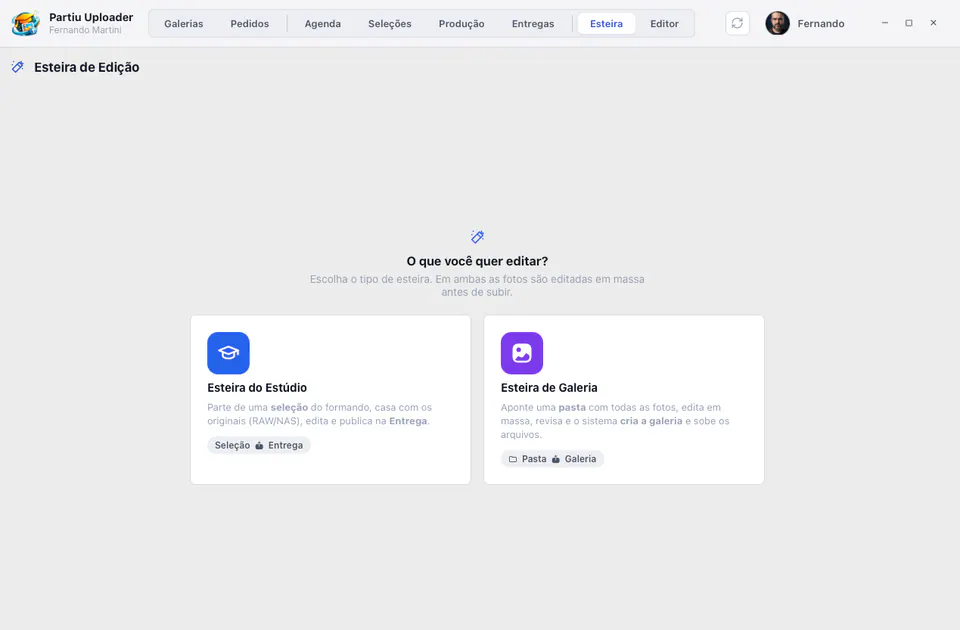
Bulk editing, step by step
The pipeline guides each job from start to finish. Choose the mode: Studio starts from a graduate selection, matches the RAW originals on your NAS, and publishes to Delivery; Gallery points to a folder, edits everything in bulk, and the system creates the gallery and uploads the files. Progress is saved per company, so you can close the app and pick up where you left off.
- Studio mode: graduate selection + RAW originals on the NAS
- Gallery mode: point to a folder and the system creates the gallery
- Bulk editing before uploading files
- Progress saved per company to resume later
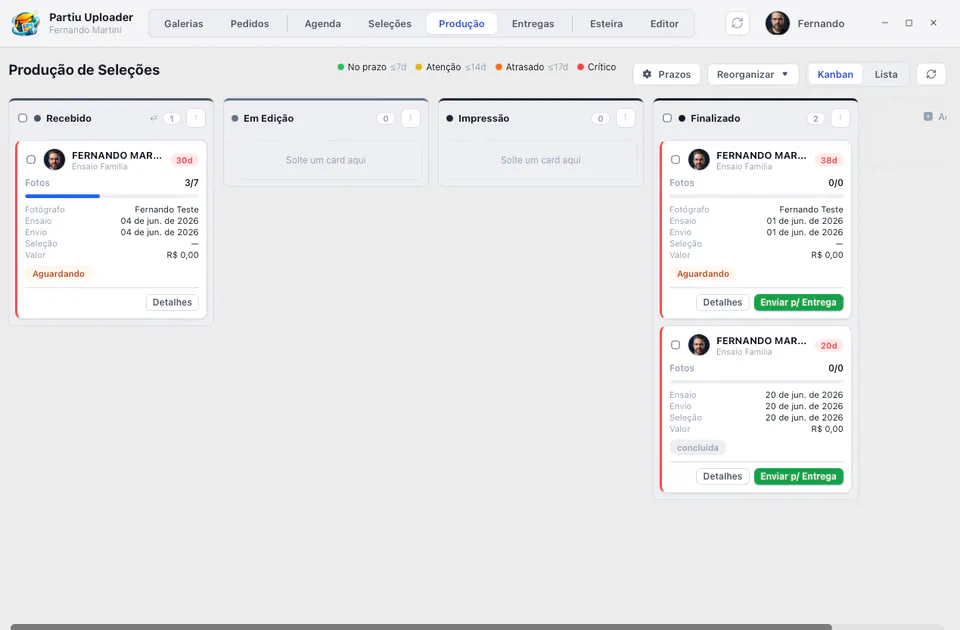
Every selection in its place
Track production on a kanban board: Received, Editing, Printing, and Done. Each card shows photographer, session, dates, photo count, and amount, with deadline alerts (on time, attention, late, and critical) so nothing slips past what was agreed. Drag jobs between stages and send them to delivery in one click.
- Received, Editing, Printing, and Done columns
- Cards with photographer, session, dates, photos, and amount
- Deadline alerts: on time, attention, late, critical
- Drag between stages and send to delivery in one click
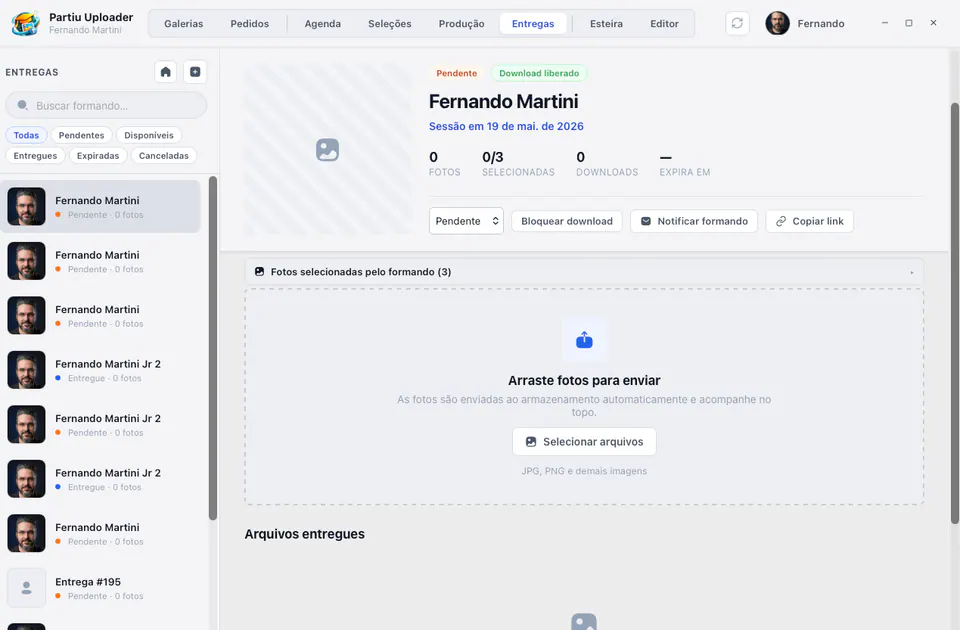
From the graduate's choice to final delivery
Track each graduate's selections with status (waiting, selecting, completed) and deadlines, and retouch the gown photo in one click. For delivery, build the high-resolution package, link images to the right person, allow or block downloads, notify the graduate, and copy the link, while tracking selected photos, downloads, and expiration dates.
- Selections by graduate with status and deadlines
- High-resolution deliveries linked to each person
- Allow or block downloads and notify the graduate
- Copy the link and track downloads and expiration
Scheduling, RAW, and NAS in the same window
Features that keep your studio running: scheduling by photographer, RAW original files, and integration with your Synology NAS.
Scheduling by photographer
Time grid with confirmed, pending, and completed sessions, by photographer and station.
RAW files
Reads major RAW formats (CR2/CR3, NEF, ARW, DNG) in the editor and pipeline.
Synology NAS
Direct DSM connection: originals are fetched by name, without mounting network folders.
QR code login
Sign in with your Partiu Formatura account or log in quickly by scanning a QR code.
Photo collections
Organize each job images into collections to edit and export in batches.
Skin tone presets
Ready-made preset library, including presets by skin tone, plus the ones you import.
Automatic updates
The app checks for new versions when it opens and updates itself, with no need to download again.
macOS & Windows
Lightweight native app for Apple Silicon and Windows 10 and 11.
Partiu Uploader Web
The studio's daily routine also runs in the browser, with nothing to install: it opens on any computer, on the photographer's laptop in the field, or on the production team's tablet, with the same dashboard login.
Galleries in the browser
Create the gallery and upload photos by dragging the files or choosing the folder, with duplicate warnings and face separation by graduate.
Selections, orders, and deliveries
The same flows as the app: selection with review, Studio orders, and high-resolution deliveries sent straight to storage.
Schedule, production, and sales
Scheduling by photographer, production board with deadlines, products, and the sales panel with coupons, kits, stock, targets, and commissions.
Editor, pipeline, and optimizer
Editor with Lightroom presets, editing pipeline with photos chosen from your computer, and JPEG optimizer, all inside the browser.
An upload queue that does not get lost
Parallel uploads with automatic retries. If the tab closes halfway, the next time it opens it shows what was left pending and skips what had already been uploaded.
What stays in the app only
Formatura TV, the connection to the Synology NAS on the studio network, and the AI Editor, which edits with artificial intelligence on the computer itself, remain in the desktop app.
From download to delivery in 5 steps
Download and install
Choose the version for your system (macOS or Windows) and finish installing in a few seconds.
Sign in
Sign in with your Partiu Formatura account. You can also use QR code login for quick access.
Upload and organize
Create the gallery, drag in the photos, and let face sorting link each image to the right graduate automatically.
Edit and produce
Edit photos in the built-in editor with your Lightroom presets or run the selection through the pipeline, which edits in bulk and fetches RAW files from your Synology NAS.
Deliver in high resolution
Track everything on the production board and build high-resolution photo deliveries, with graduates notified as soon as they are ready.
Download Partiu Uploader
Free for Partiu Formatura customers. Choose the version for your system, install it in seconds, and sign in with your company account. Updates arrive automatically.
Requirements: macOS (Apple Silicon) or Windows 10/11 · version 0.2.20. Part of the Partiu Formatura platform for companies.
The app is for the studio.
The platform is complete.
Partiu Uploader is the studio workbench inside the Partiu Formatura ecosystem. Subscribe and get it all in one place: photos and galleries with facial recognition, finance and billing, tickets, contracts, inventory, fleet, streaming, and your company's own app in the stores.
- Bulk upload with automatic face sorting
- Professional editor with Lightroom presets
- Pipeline, production, selections, and high-resolution deliveries
- Part of the complete platform for your graduation company
macOS & Windows · editor with Lightroom presets · RAW + Synology NAS.