Download and install
The .dmg on macOS or the .exe on Windows. It is an ordinary program, with no dependency to install first and no server to configure.
2 minutesPartiu Importador is the desktop app that brings the data living in spreadsheets today into Partiu Formatura: graduates, installments, contracts, products, employees, and suppliers. You point to the file, review what will be saved, and only then run the import.
Version 0.3.0 · free for Partiu Formatura customers · updates automatically
Migrating from another system, receiving a list from the institution, uploading your supplier base: everything that is manual data entry today becomes a file and a click.
CSV, delimited TXT, fixed-width TXT, XLSX, XLS, ODS, JSON, and JSONL. Encoding detected automatically, choice of tab, header row, and range, plus a sample of the raw file before any interpretation.
The app suggests the destination field for each column from its name and content, showing the confidence of each guess. Where the suggestion does not fit, you can use a constant, column join, split, conditional, or expression.
The spreadsheet says “Gold Plan” and the system has an ID. The matching screen arrives pre-linked by similarity, and anything you fix once comes back ready in the next import.
Within the file itself and against the database, using each destination's natural key: taxpayer ID, code, document number. A repeated row becomes a warning, not a duplicate record.
Mapping is saved by column name, not position. Next month's spreadsheet can arrive with columns in a different order and the template still works, and it runs the same on another machine.
Each load keeps the IDs it created. If something went wrong, rollback removes exactly what that job saved, without touching anything else.
A folder with thousands of files named by taxpayer ID becomes attachments on the right records. The app checks the matches and shows orphan files before uploading the first byte.
Before importing, the app asks the system what your database really has and warns you if any catalog field does not exist in that environment. Nothing is silently half-saved.
There is no server to install, no API key to generate, and no template spreadsheet to fill in first. Five steps separate the installer from your first rows saved in the system.
The .dmg on macOS or the .exe on Windows. It is an ordinary program, with no dependency to install first and no server to configure.
2 minutesThe same login you use in the Partiu Formatura dashboard: password, a code by email, SMS or WhatsApp, or a QR code scanned with the mobile app. Company and permissions come from the login itself.
1 minuteProduction, staging, or local. The environment stays visible in the app bar at all times and is highlighted whenever it is not production checking it here avoids the most expensive mistake in the process.
10 secondsThe app asks your database what it actually has and compares it to the catalog, destination by destination. A catalog field missing in that environment shows up now, not after the load.
1 minutePick the destination, point to the spreadsheet, map it, dry-run it, and execute with a few rows. Once checked in the dashboard, the same template runs the whole file without redoing anything.
10 to 20 minutes the first timeA real first load usually starts with a small slice of the spreadsheet: ten rows, dry run, execution, and a check in the dashboard. Once the slice is approved, the same template runs the whole file without redoing anything.
Each step answers one question and only unlocks the next one when it is resolved. You can always go back; you cannot skip ahead with a required field still open. Below, what is up to you and what the app handles on its own in each of them.
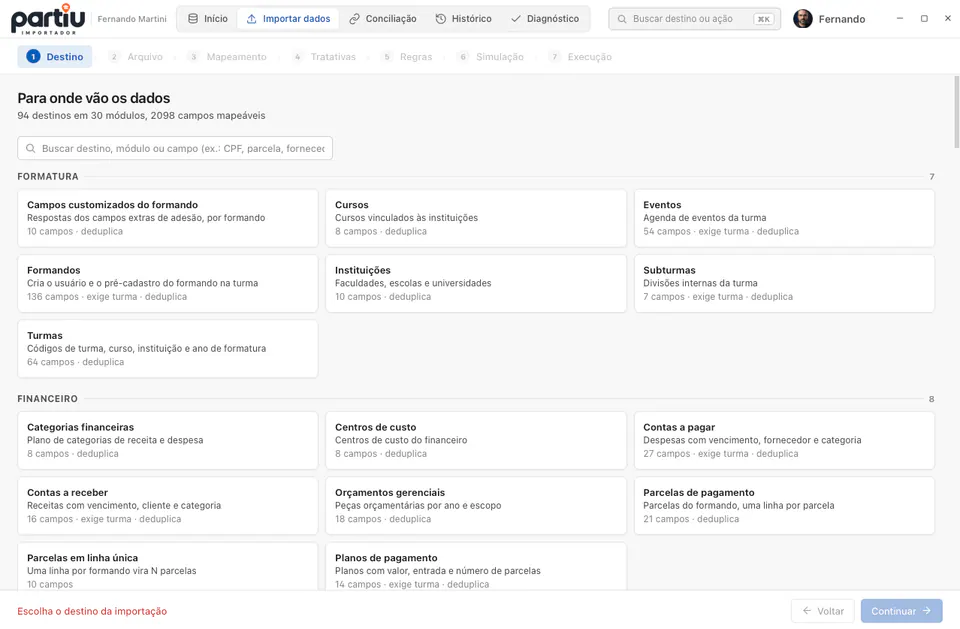
Where does the data go?
Search by destination name, by module, or by field search for “CPF” and see which destinations have it. When the destination requires a class, the scope is chosen here.
Loads from your database the catalog of allowed destinations, with fields, required flags, the size of each column, and the natural key used for deduplication.
A destination is selected and, if it requires a scope, the class is too.
How should this file be read?
Point to the file and fix whatever came out wrong: delimiter, spreadsheet tab, header row, range, rows to skip, and column ranges in fixed-width TXT.
Detects the encoding, including legacy Latin-1, proposes the delimiter, and shows the raw sample before interpreting any field that is where you see the header starting on row 5.
The app can read the columns and return at least one data row.
Which column feeds which field?
Review the suggestion field by field and resolve what is left: join first and last name, split the address, create a constant for the class, write a conditional or an expression.
Proposes the match from the column name and its content, shows the confidence of each guess, pushes pending required fields to the top, and applies transformations with a before-and-after preview.
Every required field of the destination has a defined source.
What is this value inside the system?
Confirm the suggested matches and fix the crooked ones. “Gold Plan”, “GOLD”, and “gold 12x” become the same id.
Pulls the dictionary from the system itself, filtered by your company, pre-matches by similarity, and flags what is an exact match and what is a suggestion.
No required value is left unmatched whatever is left becomes an error in the dry run, not a crooked record.
What should happen when a row is not simple?
Choose create, update, or upsert; define what happens with duplicates and with errors; mark which fields may be overwritten; set batch size, parallelism, and row filters.
Stores everything in the template and applies it row by row in the dry run and in the execution, with identical behavior in both.
Always: the step ships with safe defaults already selected.
What would happen if I ran it right now?
Read the report, fix the mapping or the spreadsheet, and dry-run again as many times as you want. The report can be exported and sent to whoever prepared the file.
Processes the entire spreadsheet without touching the database: groups errors by type with the row number, points out duplicates inside the file and against the database, shows the diff of records that already exist, and the exact JSON that would be sent.
A new template only executes after at least one dry run.
Is the load holding up?
Follow the progress and, if needed, pause, resume, reprocess only the rows with errors, or undo the entire job.
Sends in parallel batches with automatic retry when the network wavers, saves the state of every row on your computer, and uses an idempotency key so a lost response never becomes a repeated record.
It finishes on its own and a crash halfway continues from the exact point the next time you open it.
There is no official format or required template. The app opens whatever came from the other system, your accountant, or the institution's office, including the fixed-width TXT nobody reads anymore. Before interpreting anything, it shows the raw file: that is where you instantly notice the delimiter is wrong or the header starts on row 5.
The grid is organized by destination field, not by file column: the right question is “is the required taxpayer ID filled in?”, not “where did column F go?”. The app suggests the match from the column name and content, shows the confidence of each guess, and keeps pending required fields at the top.
Finding an error after saving four thousand records is the worst possible outcome of an import. That is why the app processes the entire spreadsheet without touching the database and shows a report: how many rows will be added, how many are duplicates, which have errors, and why. You fix the mapping and run the dry run again, as many times as you like.
Dates in four different formats, taxpayer IDs with and without masks, amounts with thousands separators, names in all caps, phone numbers missing the ninth digit. The app cleans each field on input, with a before-and-after preview using the real data from your file, and the transformation is saved in the template for next time.
A transformation takes a value and returns the corrected value. Because the output of one is the input of the next, the “Name” field can go through space cleanup, casing, and capitalization in an order you define and the preview shows the whole chain running on your own data.
Cleanup and shape for anything typed by hand: extra spaces, all-caps names, punctuation and emoji that came along for the ride.
Brazilian and American decimals detected from the content, currency and units stripped, sign and scale corrected.
Recognizes the shapes that show up in a real spreadsheet, including the serial number Excel keeps underneath the displayed format.
The fields that carry their own rules in Brazil: documents with and without masks, phone numbers missing the ninth digit, emails with a mistyped domain.
For when the spreadsheet value has to become another vocabulary: yes/no, state abbreviation, internal code.
For files that are not a clean table: a value that depends on another column, a field buried inside JSON.
The load runs in parallel batches, with automatic retries when the network fluctuates. The state of each row is saved on your computer: if the power goes out at row 61,400, the app reopens and continues from 61,401. If a response is lost along the way, the idempotency key ensures the record is not added twice.
Step 5 is where the import stops being generic: it is where you settle what to do with a duplicate row, a broken row, an empty cell, and a record that already exists in the system. All of it is saved in the template.
Defines what the load is allowed to do with the database. It is the first choice in the step, and it changes what the other options show.
Repetition is detected on two fronts inside the file itself and against the database by the natural key of the destination: document number, code, identifier.
A validation error in one row does not have to condemn the other 79,999. You choose how much the load tolerates.
In upsert mode the app shows a field-by-field diff of the records that already exist before the UPDATE. Only the fields you mark go through.
The default is conservative: a blank column preserves what is already saved. An incomplete spreadsheet does not wipe a record.
How much the API receives at a time and how many batches run in parallel. An unstable network calls for smaller batches; a local database takes more.
Not every row in the file should go in. The filter cuts before the dry run, so the report already comes out with only what matters.
“Gold Plan”, “GOLD”, and “gold 12x” are the same thing to whoever typed them and three different things to the database. The matching screen arrives pre-linked by similarity: you review it, fix anything that looks off, and move on. A spreadsheet with forty distinct plan values stops being a two-hour problem.
Migrating systems is rarely a single spreadsheet: there are classes, graduates, plans, and installments, each pointing to the previous one through a code that does not exist in Partiu Formatura yet. Reconciliation combines several loads into one import: reference loads go first and, when the system returns the real IDs, they replace the temporary codes in the loads that depended on them.
Scanned contracts, IDs, receipts, product photos. You point to the folder and say where the key is in the file name; the app figures out who each file belongs to and checks everything before uploading the first byte.
Thousands of files at once, straight from your computer or the company drive. Nothing is sent yet.
The app extracts the taxpayer ID, enrollment number, or code that identifies the owner from the file name: the whole name, before the separator, digits only, or a pattern you define.
The review happens before the first byte: each file appears with the name of whoever will receive it, and orphan files are kept separate for you to fix.
Progress per file, retries for failures, and resume from where it stopped. Closing the app does not restart the upload.
Importing is routine: the same spreadsheet comes back next month, someone asks what was added last week, and every now and then you need to roll something back.
The entire configuration (destination, mapping, transformations, value matching, and rules) saved under a name. Matching is by column name, so the order can change. You can favorite, export, and take it to another machine.
Each run records how many rows were added, how many failed, in which environment, and with which file. Details open row by row, with the error returned by the server.
Each row payload is kept in the local database. An interrupted load continues from the exact point in another session, without the original file, and the duplicate check is redone on resume.
Good rows stay as they are. The error report includes the values of each row, so you can fix the exported spreadsheet and reimport only those rows.
Rollback uses the IDs that load verifiably created. It is not “delete what was created today”: it deletes exactly those records.
Compares, destination by destination, what the app can write with what your database actually has. A field that does not exist in the table would be silently discarded; here it shows up before the load.
Importing is an operation that fails quietly: the record that never arrived, the field dropped on save, the retry that duplicated everything. The list below is what the app does so none of that goes unnoticed.
Each destination knows its table fields, what is required, the size of each column, and how to identify a repeated record. The app checks this against your database before it starts.
Installments, unified installments, payment plans, accounts payable and receivable, categories, cost centers, and budgets
Graduates, classes, subclasses, institutions, courses, events, and custom enrollment fields
Employees, positions, departments, time records, benefits, and job openings
Products, categories, warehouses, locations, balances, and movements
Suppliers, requisitions, quotes, orders, items, and receipts
Product structures, routings, work centers, orders, and time entries
Accounts, contacts, opportunities, activities, and territories
Vehicles, fueling, maintenance, and traffic fines
Chart of accounts, journal entries, and reconciliations
Occupational exams, risks, and mandatory training
Routes, stops, and trips
Projects, tasks, and time entries
Assets, depreciation, and movements
Store products, categories, and terminals
Ticket types, issued tickets, and coupons
Menus, recipe cards, and batches
Announcements, polls, and contact lists
Event consumables and sales
Galleries and photo-to-graduate links
Contracts and signers
Children and guardians
Inputs and cost compositions
Freelancers and shifts
Partners and offers
Album orders
Learning paths and enrollments
Access credentials
Cases and deadlines
Collection workflows and events
Raffles and prize draws
The app handles every load with the care of someone who knows the data on the other side is real.
Importing into the wrong database is the most expensive mistake there is. The selected environment is visible at all times and flashes when it is not production.
A new template only runs after a dry run. No import starts blind.
The server only writes to the fields the destination declares, always within the user's company. The file does not choose where to write.
Who imported, when, in which environment, how many rows were added, and how many failed. Everything recorded per company.
Taxpayer IDs, salaries, and bank details are masked in technical logs, and imported content is neutralized so it cannot become an executable formula when re-exported.
Each row carries an idempotency key. A response lost on the way back does not become a repeated record.
On updates, a blank column preserves what is already saved, unless you explicitly say otherwise. An incomplete spreadsheet does not wipe records.
On upsert, a field-by-field diff appears before the UPDATE and only the fields you select are applied. Updating a phone number does not have to touch the address.
When uploading documents: extension on the allowed list, executables rejected, binary signature matching the extension, and file names free of directory traversal.
A 300 MB file is not uploaded anywhere before it needs to be: reading, mapping, and dry runs happen on your computer. Only the finished record goes to the system.
Native app, with a .dmg installer for Apple Silicon and .exe or .msi for Windows 10 and 11. Same engine and same features on both.
New versions are announced inside the app and installed with one click, with the signature verified before applying. Nobody gets stuck on an old version.
Production, staging, or local, visible at all times and highlighted when it is not production. Importing into the wrong database is the most expensive mistake there is.
Reach any destination, section, or action from the keyboard, without hunting through menus.
Sign in with the same dashboard account: password, access code by email, SMS, or WhatsApp, or QR code scan from the mobile app.
Templates, history, row state, and the upload queue live in a database on your computer. A power outage in the middle of a load does not lose what was already processed.
The same importer, opened in the browser with nothing to install. You sign in with the same dashboard account and get the same 7-step wizard, with the mandatory dry run before anything is saved. The spreadsheet is still read on your computer: only the finished record goes to the system.
The same 94 destinations, the same file formats, and the same wizard: destination, file, mapping, transformations, rules, dry run, and execution. History with report, resume, and undo, templates, reconciliation of several loads, bulk file uploads, and graduate documents.
On the web you can browse every destination and field, see examples and the duplicate rule for each one, and download the XLSX template ready to fill in.
Templates, history, and the state of each row are kept in the browser itself, separated by user and by company. Whoever shares the computer does not see the work of a colleague, and you can back up and restore.
On a computer where you cannot install programs, on a borrowed machine, or for a quick load away from your desk. Open the browser, sign in, and import.
For files above 80 MB, which is the web version limit, and for anyone who imports every week: the app reads much larger files, switches environments, and updates itself.
So the history does not get mixed up, the web version works in one tab at a time. If you open another one, it offers to continue there and the first one saves everything before handing over.
No. The app adapts to the file you have: it picks the tab, header row, delimiter, and encoding, and cleans fields on input. If you prefer to start from a template, each destination also offers a ready-made spreadsheet to download.
The dry run shows the result before anything is saved, and every executed import can be undone: the app keeps the identifiers it created and removes exactly those records, without touching anything else.
Loads of tens of thousands of rows are the normal case. Uploads run in parallel batches, with automatic retries on network failures, and the state of each row is saved on your computer so it can resume.
Yes, it is a native app for macOS (Apple Silicon) and Windows 10/11. Both downloads are on this page, and the app updates itself when a new version is released.
Company administrative users, with a login to the system itself. Every import is restricted to the signed-in user's company and recorded in the audit trail.
Yes. In addition to data, the app uploads files in bulk: you point to the folder, it extracts the key from each file name (taxpayer ID, enrollment number, code), checks who each file belongs to, and only then uploads.
That is what reconciliation is for. You build the import with several loads (classes, graduates, plans, installments) and say which depends on which. Reference loads go first, and the IDs returned by the system replace the temporary codes in later loads. If any match is missing or ambiguous, the import stops before sending the affected load.
It depends on what you choose in the rules step: skip, update, or create anyway. The app identifies repeats using the destination's natural key (taxpayer ID, code, document number), both within the file and against the database, and shows the total number of duplicates during the dry run.
A blank cell preserves the saved value by default. And before the UPDATE, the app shows a field-by-field diff of existing records: only the fields you select are overwritten.
No. Reading, mapping, transformations, and the dry run happen on your computer. Only each row's finished record goes to the system, through the Partiu Formatura API, with the user's login and company.
Yes. Partiu Importador Web does the same import in the browser, with nothing to install, the same login, the same 7-step wizard, history with undo, and templates. It accepts files up to 80 MB; for larger files and for anyone who imports often, the desktop app is the best fit.
Automatically. When a new version is released, the app notifies you and installs it with one click, verifying the package signature before applying it. There is no need to come back to the website to download it again.
You need to be a company administrative user, with a login to the system itself. Every import is restricted to the signed-in user's company and recorded in the audit trail, with who imported, when, in which environment, and what was added.

Free for Partiu Formatura customers. Choose the version for your system, install it, and sign in with the same login you already use in the dashboard. Updates arrive automatically.
Requirements: macOS (Apple Silicon) or Windows 10/11 · version 0.3.0. The MSI package is for enterprise mass deployment; for normal use on Windows, use the .exe installer.
Download the app, sign in with the same account you already use in the dashboard, and import at your own pace. The dry run shows the result before anything is saved, and undo stays available afterwards.